The one setting that matters
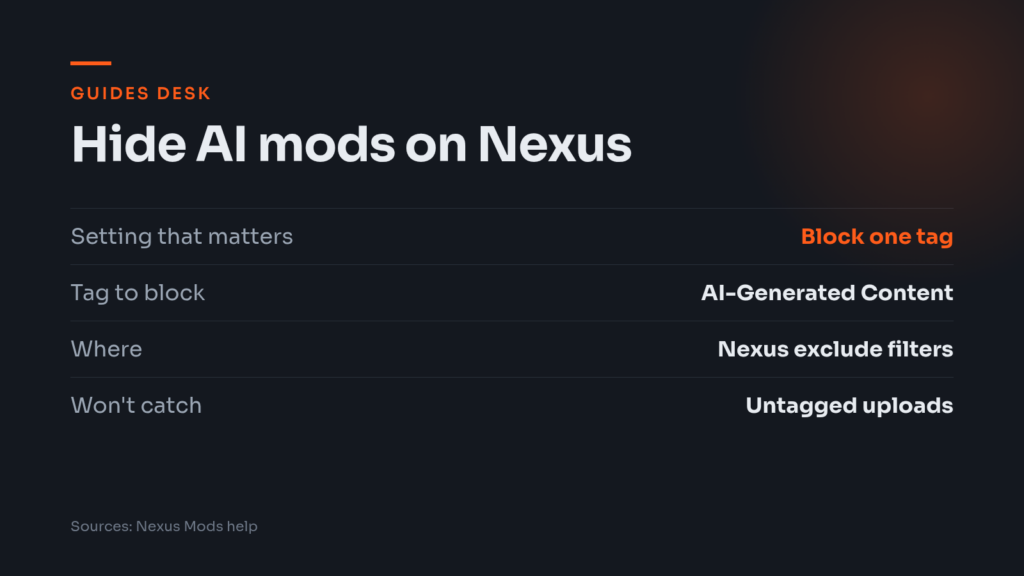
If you want to hide AI-generated mods on Nexus Mods, there is one setting that does most of the job today: block the AI-Generated Content tag. Nexus announced on 3 November 2026 that it will not ban AI-made mods, so how much of them you see is now your call.
How to block the tag
Nexus’s help article says tag blocking lives in your account settings under Site preferences, in a section called Content Blocking. Blocking a tag means mods carrying it no longer appear in file listings. The help article was last updated in 2024 and doesn’t name the AI tag, but you block the AI-Generated Content tag the same way.
- Log in and open Site preferences from your account menu.
- Find the Content Blocking section and its tag list.
- Look for the tag, or click it if it appears in the example list, and it joins your blocked tags.
- To undo it, click the X next to the tag in your currently blocked list.
That’s the whole job. There’s no AI-specific menu to hunt for, so don’t expect one.
What the tags mean
Nexus’s AI policy page sets out three labels, and authors have to pick the honest one:
- AI-Generated Content: AI produced the majority of the code, UI, voices, dialogue, translations, music or other assets.
- AI Media: AI promotional art, thumbnails, videos or mod page descriptions, plus AI-upscaled or enhanced page images, meaning material outside the mod content in-game.
- AI Assisted: human-led mods where AI played a supporting role, such as texture or audio upscaling or early concept art.
AI-Assisted mods now come with homework. The post says they need a public explanation of how and where AI was used, and the policy page lists the tools used and exactly which AI outputs are in the final mod. Nexus is also making AI tags more prominent on mod pages, shown right after adult-content tags.
Our take: if you only want to avoid mods built by AI, block AI-Generated Content first. Adding AI Media also hides mods that are human-made but use AI thumbnails, which may be more than you intend. Whether to block AI Assisted depends on how strict you are, and the written explanation lets you judge each one instead.
What blocking won’t catch
A tag block is only as good as the tag. The policy page is blunt about it: Nexus relies on authors to tag their uploads accurately. If you spot a mod that looks like it has unlabelled or mislabelled AI assets, you can report it for the Trust and Safety team to review. The post itself admits that not everyone will disclose, which is why moderation standards with consequences are coming.
Timing matters too. Disclosure is mandatory for new uploads from 3 November 2026, and a 60-day grace period runs to 2 January 2027 for the new requirements, including the detailed AI-Assisted statements and the new permission settings. Basic disclosure is already required and still enforced. After the grace period ends, untagged or non-compliant mods go to Trust and Safety, and authors who don’t fix them face warnings, restrictions or removal. Expect older mods to be labelled unevenly until then.
Blocking also hides things, it doesn’t judge them. A mod whose author tagged it as AI Assisted will still show up if you only block AI-Generated Content. If a particular author keeps turning up, the same Content Blocking section lets you block authors by exact username.
What is coming next
Nexus says it is refining its content preference tools so you can turn off AI-generated content directly from game pages and the homepage, without digging through settings. After that, the controls are due in search and in the way mods are displayed on game homepages. No dates were given, so for now the Site preferences route is the one that works.
The same post covers new permission options for AI usage and training and for forks and derivative mods. They default to “Ask me”, which means nobody may use a mod’s assets for AI training or forking without the author’s written permission. Nexus also says it won’t use mods to train AI or sell or license them to anyone who does.
Once the filter is set, browsing works as before. Our Baldur’s Gate 3 mods guide and Stardew Valley mods guide are good places to see how a cleaner listing feels. One setting gets you most of the way, and a handful of reports from the community will do the rest.