Who can be searched
What this fixes: not knowing whether your Discord messages, or your server’s channels, can end up on a public web page. Who it’s for: anyone who posts in a Discoverable Server, and anyone who runs one. Everything below is taken from Discord’s 27 October 2026 blog post and its Help Center articles on Web Presence and Server Discovery.
The short version: Discord is turning the most public corner of its platform into something search engines can read, and the defaults lean towards “on”. If you’d rather not be part of that, you have a few weeks and a handful of toggles.
Two dates, and only one kind of server
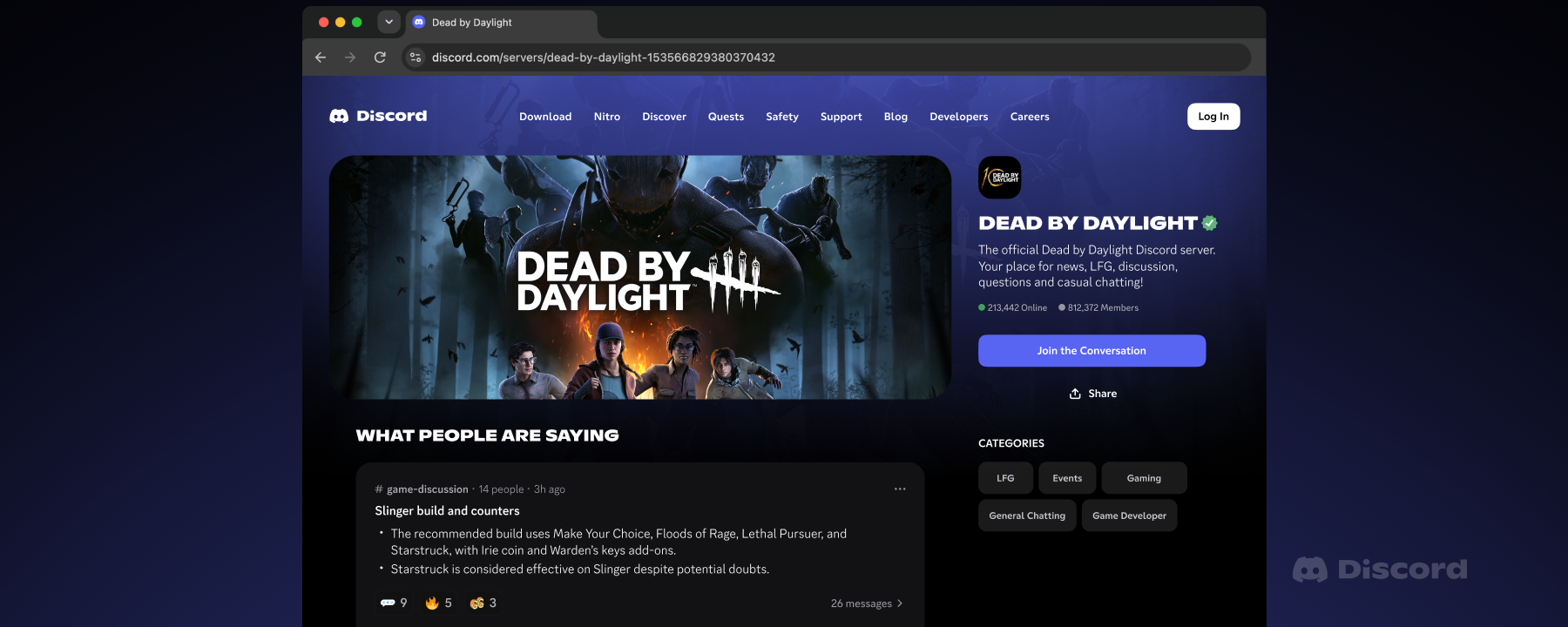
This only applies to Discoverable Servers, the ones listed in Server Discovery that anyone can join without an invite. To qualify, a server needs at least 1,000 members, has to be at least eight weeks old and must meet activity and safety requirements. Discord says there are more than 63,000 of them. Private servers, DMs and group DMs are not included.
From 16 November 2026, every Discoverable Server gets a Server Web Page. If the admins haven’t set one up, a default page goes live using details from the Server Profile. That page may also show Channel Summaries of what’s being talked about in public channels. From mid-December 2026, messages from public channels can appear on those pages and in web search too, without usernames and avatars, if the server’s admins allow it. Discord says the rollout is gradual, so the first messages may take a few weeks to show up.
Given that Take-Two has already subpoenaed Discord over GTA 6 leaks, it’s a fair moment to look at what your own account says in places other people can read.
Members: one switch covers every Discoverable Server you’re in
- Open User Settings.
- Go to Data & Privacy.
- Find “Show my message content from Discoverable channels on web pages” and switch it off.
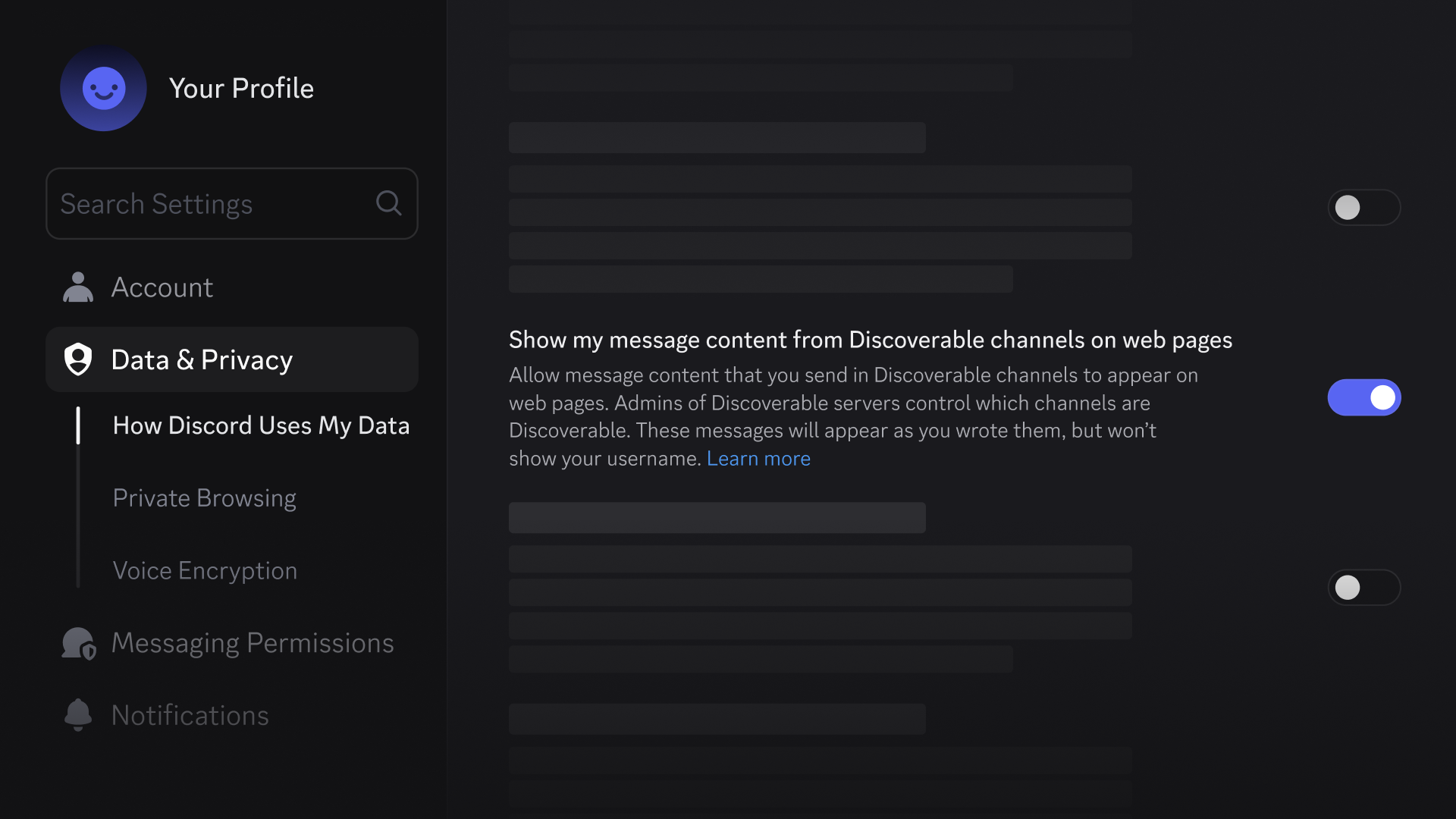
Discord’s blog says you can do this now, before messages start rolling out in mid-December, or at any time after. The default depends on where you live. In the EU, UK, Canada, Brazil, Australia and South Korea the setting is off by default because of legal restrictions, so your messages won’t appear unless you turn it on. Everywhere else it’s on unless you turn it off. Users in the teen age group are excluded completely and can’t enable it until they’re adults.
Messages from before mid-December 2026 won’t be shown, whatever your setting. Channels that take part carry an icon in the channel header, so you can see before you post. And note the limit: Channel Summaries are generated separately, from broader channel topics, and still appear on Server Web Pages unless admins turn them off. Your personal toggle only governs Channel Messages.
Admins: two independent toggles, both on by default
Web Presence settings are available on desktop and browser only for now. Only the server owner or members with the Administrator permission can change them, and bots can’t.
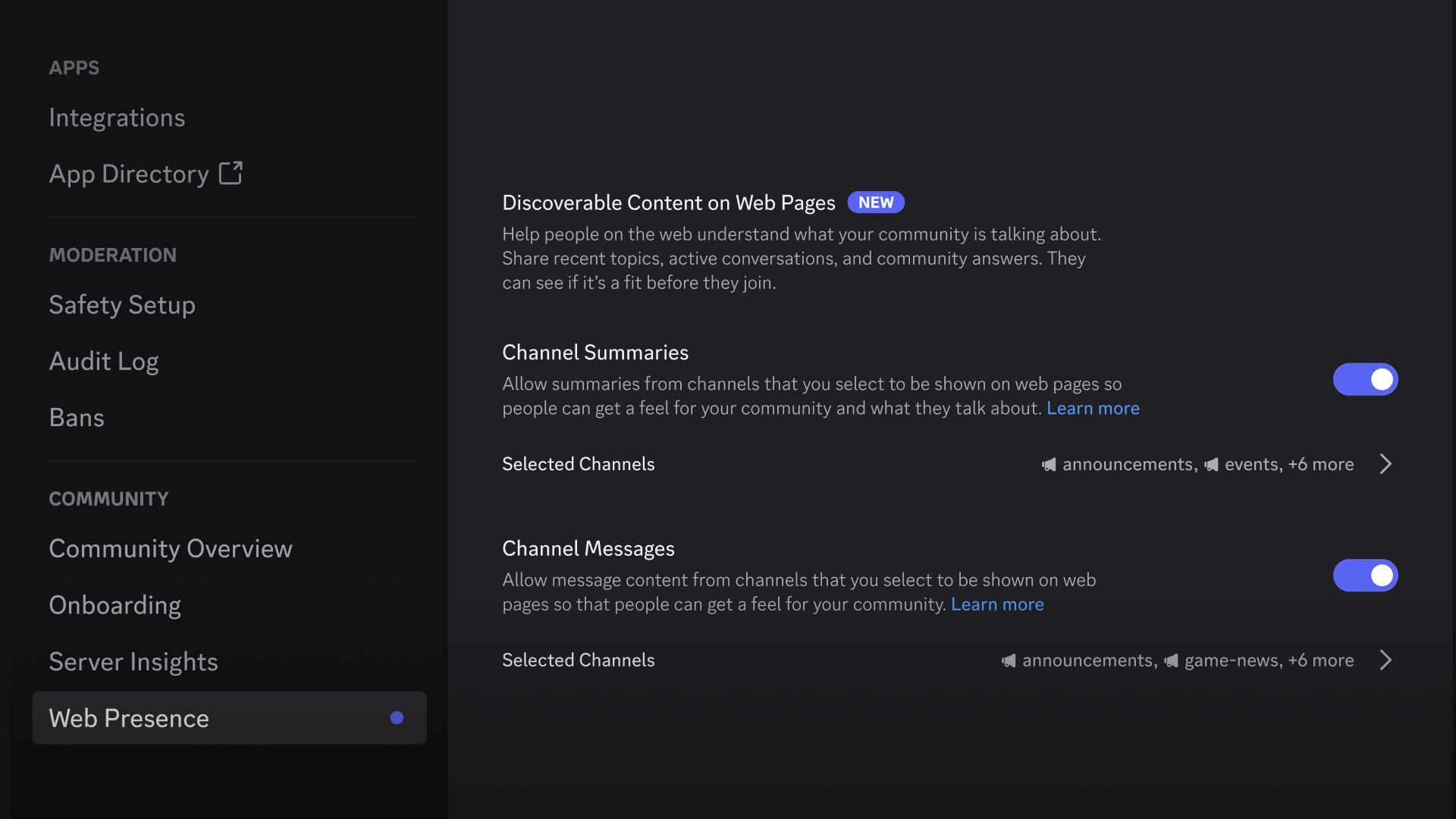
- Open Server Settings.
- Under Community, select Web Presence.
- Under Discoverable Content on Web Pages, use the Channel Summaries and Channel Messages toggles. Each has its own list of channels, so you can pick different ones for each or switch one off without touching the other.
- Use Search channels to find a channel, or Select All and Deselect All to change everything at once, then select Save Changes.
Private channels, such as role-restricted ones, are never included. Public channels are included unless you change that. When you create a new public text channel, the creation window has a Discoverable section with All Content, Summaries Only, Messages Only and Off. Discord also says Channel Summaries are created using AI and “may not always be accurate”, so admins who leave them on should check what their page ends up saying.
Doing nothing is a choice with a date on it: from 16 November Channel Summaries may start appearing, and Channel Messages follow in mid-December. If the prompt titled “Reach new members on the web” appears when you next open your server, its Web Presence button takes you straight to these settings.
Switching off is not the same as taking down
This is the part we’d read twice. Discord’s own help article says turning off Channel Summaries or Channel Messages “stops new content from being generated or shown going forward”, but content already published may remain visible until it’s individually removed. In practice:
- Deleting a message removes it from the Discord app and Discord web pages. Messages sent while your member setting was on stay up unless you delete them.
- Search engines run their own caching and indexing. Discord says it doesn’t control how long others keep cached or indexed copies, so results may linger and may need action through the search engine.
- Turning off both toggles doesn’t remove the Server Web Page. It stays live while the server is Discoverable.
- Your member setting and the admin toggles are separate. Turning off an admin feature doesn’t change members’ individual privacy settings, and region, age and each member’s own setting can still decide whether a given message is eligible.
To get rid of the page itself, an admin has to turn off Discoverability, which turns the server back into a Community Server. Discord says the page is then taken down and both features stop contributing new content, but that doesn’t automatically remove content already published on the web. Disabling Community also turns off Discoverability automatically. Discord’s blog says that if you don’t want a Server Web Page, you can always switch back to being a Community Server.
We think the order matters here. The same rule we’d give for opting into the Steam client beta applies in reverse: know how you back out before you opt in, and with this feature the back-out is only partial. Because public channels are on by default for admins, and the member setting is on by default outside six regions, we’d treat the off switches as something to settle before the pages go live, not after. Admins should walk their channel list before 16 November; members who’d rather stay out of search should flip the toggle before mid-December.